Trading in Blox Fruits without a calculator is like navigating the Grand Line without a Log Pose — you will get scammed. This comprehensive guide teaches you to use Blox Fruits calculators effectively, understand W/F/L ratings, and compare trades against maintained value references before accepting.
What Is a Blox Fruits Calculator?
A Blox Fruits calculator is a web-based tool that:
- Compares values of items on both sides of a trade
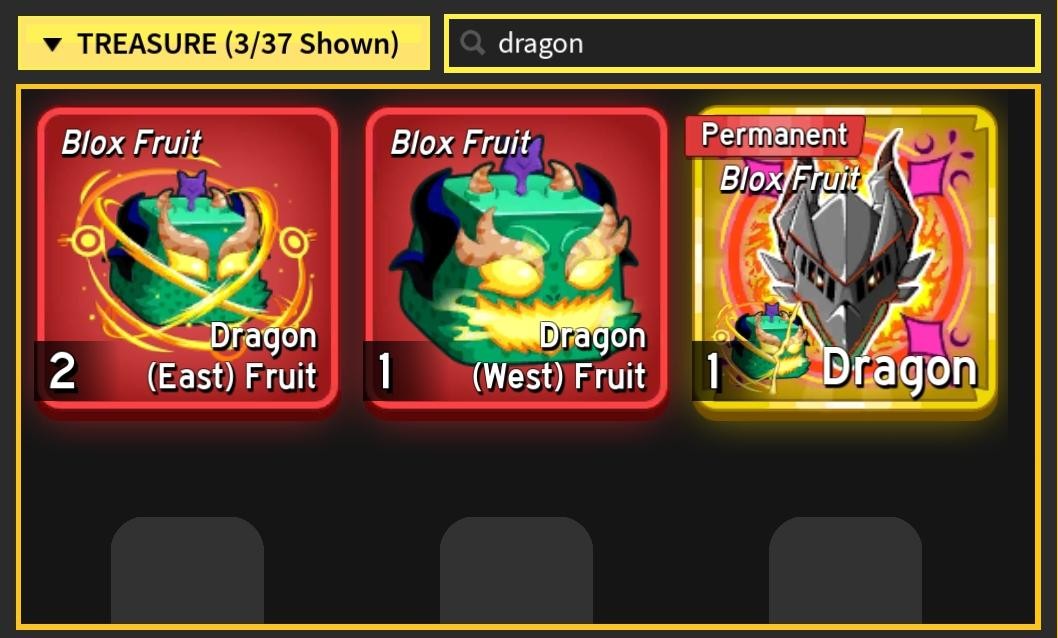
- Calculates delta (percentage difference)
- Determines W/F/L (Win, Fair, or Lose rating)
- Shows demand ratings (1-10/10 scale)
- Displays trend indicators (Rising, Stable, Dropping)
Why you need one: Values can change after updates, events, and demand swings. Manual estimation can miss large gaps between physical and permanent fruit values.
Top Blox Fruits Calculators (2026)
1. BloxFruitsTrades.com Calculator
URL: https://bloxfruitstrades.com/trading-tools/
Features:
- Physical + Permanent value toggle
- Maintained value references
- Chrome extension available
- Fruit and gamepass coverage
- Mobile-optimized interface
Best for: All-around use, beginners to experts.
2. BloxFruitsValues.com Calculator
URL: https://bloxfruitsvalues.com/calculator
Features:
- Community-driven values
- Frequent value updates
- WFL & WBL support
- Demand tracking (1-10/10)
- Value history graphs
Best for: Cross-checking community consensus.
3. FruityBlox Calculator
URL: https://fruityblox.com/blox-fruits-value-list
Features:
- Trade-value list integration
- Frequent updates
- Clean, fast interface
- Physical/Permanent toggle
Best for: Quick calculations and comparison checks.
4. 123Demands Calculator
URL: https://123demands.com/Blox-Fruits-Values
Features:
- Demand charts
- 30-day price history
- Trend analysis
- Periodic updates
Best for: Market trend analysis, long-term planning.
5. BloxFruitsCalculator.uk
URL: https://bloxfruitscalculator.uk
Features:
- Simple UI (beginner-friendly)
- Fast load times
- No ads
- Limited gamepass values
Best for: Beginners, quick checks.
Note: Cross-verify values on 2-3 calculators before high-value trades ($100M+). If BloxFruitsTrades shows Leopard at $55M and FruityBlox shows $61M, use the average for negotiations.
How to Use a Calculator (Step-by-Step)
Complete Walkthrough
Step 1: Navigate to Calculator
Open the trading calculator and load the interface (two sides: ‘Your Items’ and ‘Wanted Items’).
Step 2: Add Your Items
- Click ’+ Add Item’ under ‘Your Items’
- Type fruit name in the search bar
- Click fruit icon to add to your side
- Repeat for all items you are offering
Step 3: Add Their Items
Click ’+ Add Item’ under ‘Wanted Items’ and search for their fruit.
Step 4: Toggle Physical vs Permanent
CRITICAL STEP — most scams happen here.
- Look for ‘Physical / Permanent’ toggle on each fruit card
- Click toggle to switch between variants
- Verify both sides are set correctly
Example verification:
- Your side: Buddha Physical ($10M)
- Their side: Leopard Physical ($55M)
- NOT: Leopard Permanent ($1.69B) — would be a huge scam
Step 5: Read Results
Calculator displays:
- Total Value (Your Side) — sum of items you offer
- Total Value (Their Side) — sum of items they offer
- Delta — percentage difference
- W/F/L Rating — Big Win, Win, Fair, Lose, Big Lose
Rating scale:
- Big Win (BW): +16% or more
- Win (W): +6% to +15%
- Fair (F): -5% to +5%
- Lose (L): -6% to -15%
- Big Lose (BL): -16% or worse
Pro Tip: Aim for ±5% delta or better. Anything within -5% to +5% is considered fair value. Avoid trades with -10% or worse delta.
Understanding W/F/L Ratings In-Depth
Win/Fair/Lose Thresholds Explained
| Delta Range | Rating | Meaning | Action |
|---|---|---|---|
| +16% or more | Big Win (BW) | You receive 16%+ more value | Be skeptical — possible scam |
| +6% to +15% | Win (W) | Better value | Accept |
| -5% to +5% | Fair (F) | Balanced trade | Accept |
| -6% to -15% | Lose (L) | Overpaying | Decline or negotiate |
| -16% or worse | Big Lose (BL) | Terrible deal | Decline immediately |
Why ±5% Is the ‘Fair’ Zone
Market Variance: Values can move around update windows based on:
- Supply/demand shifts
- Update impacts (buffs/nerfs change values overnight)
- Event releases (limited fruits spike demand temporarily)
Calculator Differences: Different calculators show ±2-5% variance.
Personal Preference: Some players overpay 5% for fruits they really want (impatience premium).
Real Trade Examples
Example 1: The ‘Small Add’ Strategy
Want Leopard but short on value?
Your offer: Buddha Physical ($10M) + Portal Physical ($10M) = $20M
Their offer: Leopard Physical ($55M)
Delta: -63.6% — Big Lose
Fix: Add Dough ($30M) and a Gamepass to close the gap to fair.
Example 2: Overpay Trap
Your offer: Kitsune Permanent ($2.3B)
Their offer: Leopard Permanent ($1.69B) + Dragon Physical ($350M) = $2.04B
Delta: -11% — Lose
Verdict: Decline. You are overpaying $260M. Counter-offer or walk away.
Common Scam Patterns to Watch For
- Physical/Permanent toggle bait — they show Physical, swap to Permanent at the last second
- Demand-inflated trades — they claim 10/10 demand for a 5/10 fruit
- Multi-add overload — many low-value items to look fair on paper
- Stale value lists — using last week’s higher value on a falling fruit
Warning: Always re-check the calculator immediately before accepting any trade. Values can shift quickly during patch weeks.
Calculator Best Practices
- Cross-verify on 2-3 calculators
- Check the date of the value list
- Use Physical/Permanent toggle deliberately
- Factor in demand, not just raw value
- Use trend arrows (rising fruits warrant a small premium; dropping fruits a small discount)
Frequently Asked Questions
Q: Are all calculators accurate?
No. Accuracy varies from 96% to 99%. Always cross-reference for high-value trades.
Q: Why do values differ between calculators?
Different sample sizes, update frequencies, and trader communities. Average them.
Q: What is the most important rating?
W/F/L combined with delta percentage. Anything within ±5% is fair.
Q: How often should I recheck values?
For trades over $100M, check immediately before accepting. Values can move quickly around updates and events.
Last Updated: May 18, 2026. Sources: maintained value references and calculator checks.